

Lead magnet ebook software comparison
Which software should you use for a lead magnet ebook?
This guide compares tools for producing the ebook after its content has been planned or written. The right choice depends on whether you are starting with a finished manuscript, visual page designs, published articles, or content that also needs lead-capture hosting.
The short answer
Use Folius for a finished, text-heavy manuscript. Use Canva for a short visual ebook. Use Designrr to repurpose content from a blog, document, or recording.
Folius
Format a finished Word manuscript as a multi-chapter book.
Canva
Design a short, visual ebook and its campaign graphics.
Designrr
Turn existing blog or recorded content into an ebook.
InDesign
Design a complex or highly visual document page by page.
These tools can also be used together. For example, you can design the cover and LinkedIn graphics in Canva while formatting the ebook’s text in Folius.
Lead magnet ebook software compared
Compare tools for creating a lead magnet ebook.
The main difference is the work each tool is designed to do. Compare how your content enters the tool, how the pages are laid out, what files it exports, and whether it includes lead-capture features.
Folius
$12/month for PDF, hosted images, and cover uploads; $99/yearA finished, text-heavy manuscript of roughly 20–60 pages or more
A Word manuscript or text written in the editor · PDF, EPUB, Word, HTML, Markdown, native archive
Canva
Free; Pro $180/year for one personA short, visual ebook, plus its cover and campaign graphics
A template, Canva Doc, Word import, or blank design · PDF and visual/document formats; no native EPUB download
Designrr
$29 Standard, $39 Pro, or $49 Premium per monthTurning blog posts or recorded content into an ebook
A blog URL, Word file, or Google Doc; more sources on higher tiers · PDF; EPUB, Kindle, and flipbook on Pro+
Beacon
Free; Lite $19 or Professional $49 per monthCreating the ebook and its opt-in or resource library together
Blog content or text entered in its editor · PDF, Smart PDF, hosted resource libraries and forms by plan
Prices in USD before tax, checked on 11 September 2026. Canva Pro is shown at its current annual US price for one person. Designrr’s EPUB, Kindle, and flipbook exports require Pro or above. Plan availability and regional prices can change.
Detailed recommendations
Choose the tool that matches the material you already have.
Folius
Use Folius for a finished manuscript
Import the approved .docx, choose the book’s typography and page settings, and check the live print preview. When the ebook is ready, pay $12 for one month to add hosted images and a cover and export the PDF.
Canva
Use Canva for a short visual ebook
Use a Canva template when each page needs its own visual composition. Canva is also useful for the cover, carousel, advert, and LinkedIn graphics even if another tool formats the ebook’s text.
Designrr
Use Designrr to repurpose existing content
Designrr can import content from a blog, Word file, or Google Doc. Higher plans also support additional sources and formats. It is the more suitable choice when importing and repurposing content is the main requirement.
When Folius is not the right tool: Folius does not import a blog URL, transcribe recordings, write a first draft with AI, host a flipbook or opt-in form, or provide a social-media design and brand-kit suite.
Folius pricing for a lead magnet
Plan on $12 for a Folius lead magnet.
A typical lead magnet needs a PDF, a cover, and interior images. Folius membership is required for PDF export, hosted images, and cover uploads. The free plan lets you prepare and preview the text, but it is not sufficient for the usual finished deliverable.
$12
One month
Export the screen PDF and add a cover and hosted images, plus all other member features
$99
One year
For regular publishing, collaboration, hosted images, and public sharing
$0
Before subscribing
Prepare and preview the text, and export EPUB, Markdown, or a backup—but not PDF or hosted images
Editing and print preview
What happens when the manuscript changes?
Folius lays out the book again when the text changes. Its live print preview uses the same layout engine as the PDF export, so you can check the revised page breaks before exporting the file.
- Import a structured Word manuscript
- Set typography, trim, margins, and chapter openings
- Inspect page breaks, widows, orphans, and running matter
- Invite the CEO or editor without buying another seat
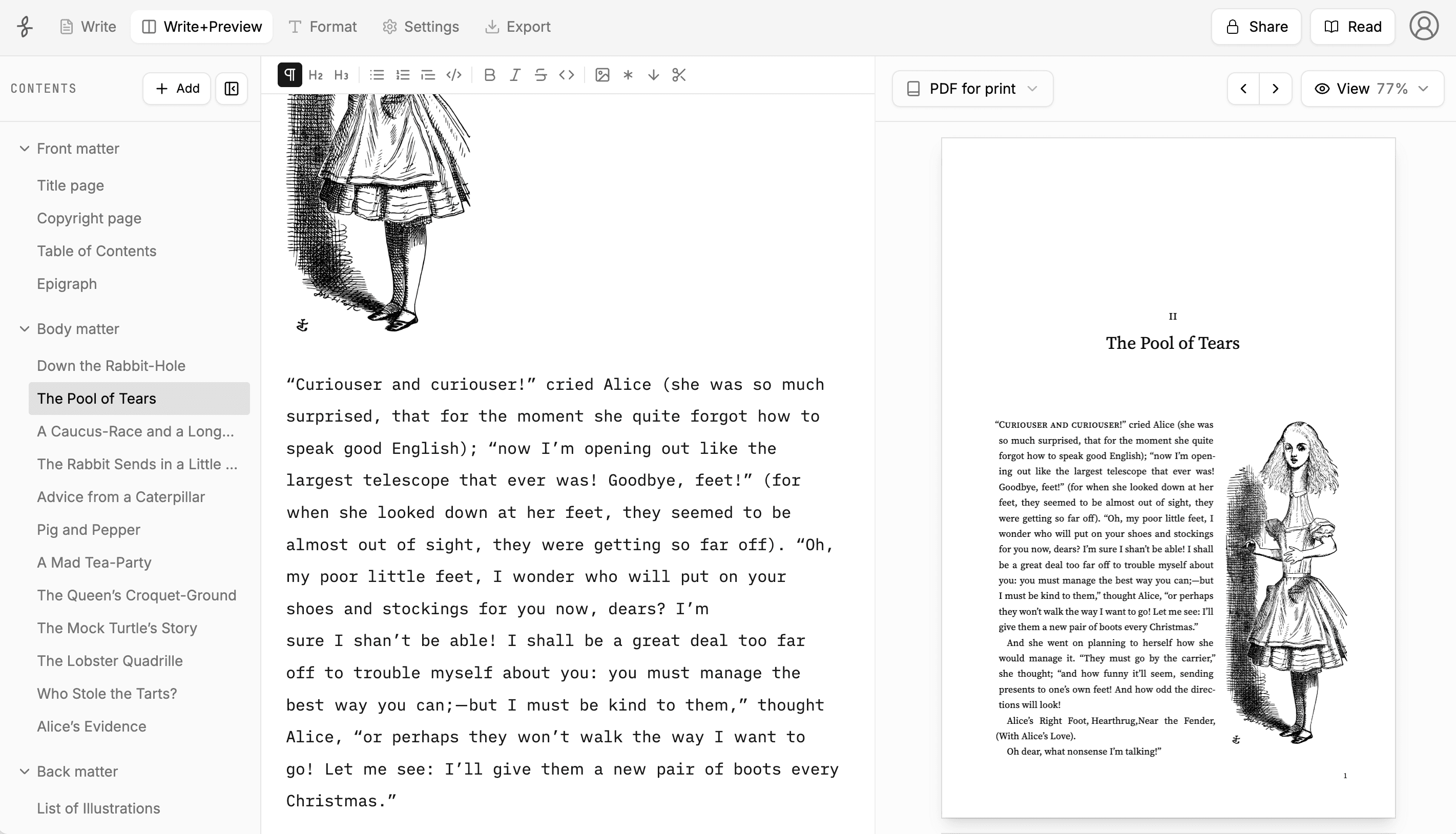
See examples of long, text-heavy interiors on the examples page or compare what is free and paid. Folius currently cannot place an image above a chapter title; baking a cover into an EPUB requires member image hosting.
Lead magnet ebook FAQ
Common questions about lead magnet ebooks.
Do I need InDesign to make a professional lead magnet ebook?
Usually not. InDesign is appropriate when a designer needs exact control over every page or a complex, highly visual layout. For a text-heavy playbook, report, or whitepaper that may still change, a book formatter is usually easier to maintain.
Can I use Canva for a 40-page ebook?
Yes. Canva is a strong choice when the ebook is short and visual. For a 40-page, text-heavy manuscript, changes may require page-by-page adjustment and repeated checks of the contents and page numbers. Folius automatically lays out a structured, multi-chapter manuscript again after the text changes.
Is the Folius PDF export free?
No. Print and screen PDF require membership at $12 for a month or $99 for a year. Hosted images and cover uploads also require membership. Writing, Word import, formatting, live print preview, EPUB, Markdown, and Folius backup export are free. No account or card is required to start.
Can I add a cover and images on the free plan?
Hosted images and cover uploads require membership. Because most lead magnet ebooks use a cover, interior images, and PDF delivery, plan on paying for at least one $12 month. Membership includes approximately 250 MB of hosted image storage.
Can our CEO or editor review the ebook without paying?
Yes. Invited collaborators do not need their own Folius membership. The book owner needs active membership to invite editors and use live collaboration. Public read-only sharing is also a member feature.
Should a gated lead magnet be PDF or EPUB?
PDF is the usual format for an email-gated download because its layout stays fixed. EPUB adapts to the reader’s screen and can be offered as an additional reading option. Folius exports EPUB for free; PDF requires membership.
What if we only make one lead magnet this quarter?
You can format the manuscript and export a free EPUB first, then pay $12 for one month when you need the PDF. The $99 annual membership is intended for people who publish regularly or need ongoing collaboration, image hosting, or public reading links.
Evaluate Folius
Test Folius with your manuscript before choosing.
No account or card is required. Import a Word document, format the book, inspect the print preview, and export an EPUB for free. Exporting the PDF or uploading hosted images and a cover requires a $12 monthly or $99 annual membership.
Canva, Designrr, Beacon, Flipsnack, and Adobe InDesign are trademarks of their respective owners. Folius is not affiliated with or endorsed by these companies.